


Being the major player in internet search, if you want your voiceover website to show up more often in Google searches, having a Google Business Profile will help.
(You may know it by an old name – it used to be called Google My Business or Google Business Page.)
What is a Google Business Profile?
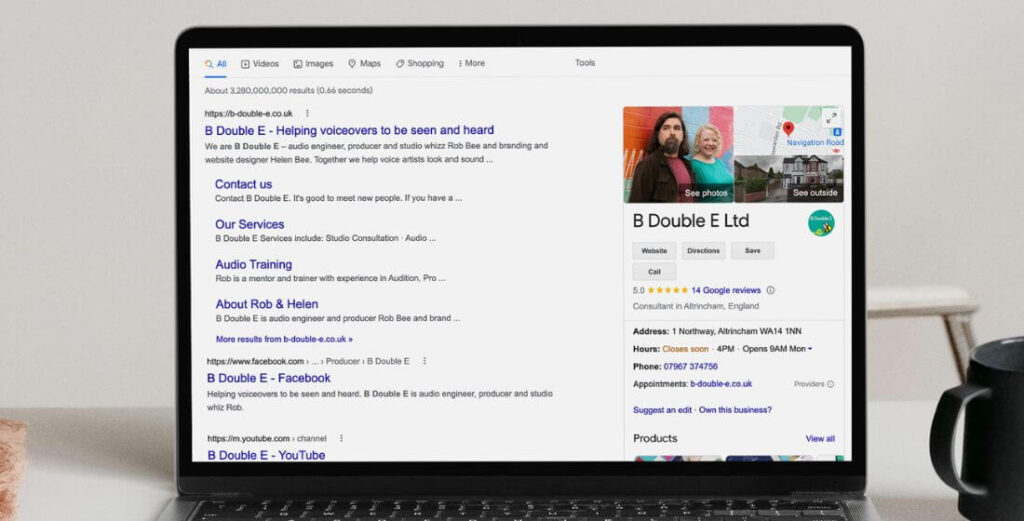
A Google business profile is the part that appears on the right hand side of a google search window. It helps other people to find out who you are and what you do. It’s a place to list your services, photos, contact details and a trusted place to get reviews. This is ours…
Why does a voiceover need a Google Business Profile?
1. It’s essential for your SEO
The biggest reason to get a google business profile set up and accurate is it will help you’re your website get found in search results. If you want to appear higher on google – you need to get a business profile. It’s not the only thing that will help you rank higher so check out my Beginners guide to SEO (Search Engine Optimisation) for voiceovers for more advice on that.
Getting a page will also makes your business look more professional/official – to both prospective clients and for SEO. Why? Before you can set up a profile, it has to be verified by google. More on that below.
From personal experience, our website gets much higher search traffic since setting up an account. And that’s the same for my voiceover website clients too.
2. It raises the profile of your brand
Anything that helps get your name out there and promotes your business is good news for you and your voice over brand. This is a simple and effective way to get you and your voice over work more visible online. When you’re building your profile add info about what you do, link to your website, showcase your services, add your contact details, logo, photos and share blog posts.
It all helps your profile rank higher in google searches which will make your brand more visible to potential clients and customers. And that will help get you work.
3. It’s FREE!
Who doesn’t like something that is both free and useful?!
4. It’s easy and quick to set up (see the guide below)
I understand that techy stuff isn’t for everyone, but this really isn’t technical or complicated to do. It won’t take you long to get a basic profile set up. And I can’t stress enough how important it is for your online visibility.
5. Reviews
Good testimonials will help you get new clients. Fact. And generally people trust google reviews (because you need an account to post one. Start asking clients to leave you a google review and re-use these testimonials on your website and social feeds.
Google gives you a hand link to share so people can quickly and easily leave you a review. To show you what I mean – this is the link to leave B Double E a review… https://g.page/r/CcY66kJcHaslEB0/review. And if you could leave us a review while you’re there we’d very much appreciate it!
How to set up a Google Business Profile for voiceovers
Here’s how to set up an account. There is a handy how-to video guide at the bottom.
If you’ve already got a google account, you can skip this first part.
- If you don’t have an account – click here to get to Google and click ‘sign in’ (button in the top right corner of your screen)
- Click ‘create account’ and select ‘for work or my business’ option. This will open a form for you to create your account.
- Add your phone number, a recovery email address, date of birth and gender. Click next.
- A window will pop up for you to verify your phone number via a text. Enter the code you receive and click ‘verify’.
- Choose ‘express personalisation’ & click next. Scroll down the next window to confirm your settings and then the privacy & terms page.
- You now have a profile – DO NOT click ‘continue’ here. Just close the window and move to the next steps.
—– (if you have a google account start here…) —–
- Go to google.com/business – click ‘manage now’ and sign into your google account.
- Type your business name into the search box (if it already exists you can claim your profile) but I’ll presume this is new, so select ‘create a business with this name’
- Choose your business category. There isn’t one for voiceover so you’ll need to be a little creative here. You can add more than one category later, but for now just one. My suggestions would be one these but search for others that might suit you. Here’s a complete list of categories:
– Artist, Recording studio, Media company, Radio broadcaster
– A few others for voice coaches… Vocal instructor, Training provider, Consultant
- Next is location. Chances are you don’t want people visiting if you’re studio is based in your home – so select no. It’ll ask for areas where you work. Type in and select next.
- Contact information – complete your website and phone number (this will be displayed on your profile).
- Then you’ll need to verify your business. Google does this in 1 or 3 ways…
- A phone call (most common)
- Send you a verification code in the mail (usually takes 1-2 weeks)
- Video proof (they’ll give instructions)
When you profile has been verified
When you’ve received your postcard, verified your account you can then start to add information in to your profile. Add your services, opening hours, add a business description (this is a bit like your about page) and make the most of the 750 characters you get! Add photos (but NOT stock images).
And there you have it. Your new Google Business Profile.
Step-by-step video guide
Want ongoing support for your voice actor business?
Setting up your Google Business Profile is just one piece of getting seen online. If you’d like ongoing support with your branding, website and marketing – plus a community of voice actors to ask when you get stuck – come and join Be Seen, Be Heard, our monthly membership for voice actors. You’ll get direct access to Helen (and Rob) every week, plus a dedicated forum for branding, websites and marketing questions like this one.